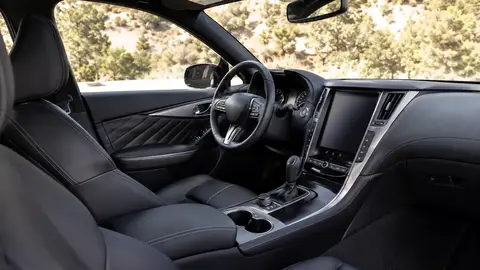
Fully digital instrument clusters (replacing analog gauges with a configurable screen) are now common from roughly $25,000 upward, while head-up displays (HUDs) that project speed, navigation and alerts onto the windshield remain more concentrated in $32,000+ trims, with the most advanced augmented-reality HUDs mostly on premium models. The combination of a clear digital cluster plus a well-placed HUD generally reduces how often a driver looks away from the road compared to either alone, but poorly designed digital clusters — with too much on-screen information or slow refresh rates — can be more distracting than the analog gauges they replaced.
At a glance
| Feature | Typical availability |
|---|---|
| Fully digital instrument cluster | Common from ~$25,000 upward, sometimes standard, sometimes trim-gated |
| Basic head-up display | Optional from ~$32,000, more common on mid/upper trims |
| Augmented-reality HUD (full windshield) | Mostly premium/luxury models |
| Configurable cluster layouts | Growing but not universal even on digital-cluster cars |
Digital clusters: more than a screen swap
A digital instrument cluster replaces physical needles and dials with a screen that can reconfigure its layout — showing a large map when navigating, a simplified speed-and-charge display in an EV, or a sport-mode tachometer-focused view. The value isn't just aesthetic: a well-designed digital cluster can surface exactly the information relevant to the current driving context (charge level on a highway EV road trip, tire-pressure warnings, active ADAS status) without cluttering the view during normal driving.
Head-up displays: where the projection actually lands
Basic HUDs project a small area of information — speed, speed-limit sign recognition, basic navigation arrows — onto a small combiner panel or directly onto the windshield glass in the driver's direct sightline. More advanced augmented-reality HUDs use a much larger projection area and can appear to overlay turn arrows directly onto the road ahead, which is a genuinely different experience from the smaller, static basic version, but this capability remains largely limited to premium vehicles due to the more complex, expensive projection hardware required.
Does more information on-screen mean more distraction?
Not necessarily, but poor design can make it so. Research on driver distraction consistently shows that glance duration and frequency matter more than raw information volume — a head-up display that keeps critical information (speed, upcoming turn) in the driver's direct line of sight can reduce how often they glance down at the instrument cluster or center screen. But a cluttered digital cluster crammed with unnecessary widgets, or a HUD with too much scrolling text, can increase cognitive load rather than reduce it.
- Look for HUDs with adjustable brightness and height — glare and poor positioning are common complaints.
- Check whether the digital cluster's most important info (speed, gear, warnings) stays in a fixed, high-contrast position regardless of the selected theme.
- Ask whether HUD content is customizable — some let you turn off less-critical elements like media info to reduce clutter.
Combination systems: the current best-practice approach
The strongest setups pair a clean, mostly-fixed-layout digital cluster with a HUD that shows only the most time-critical information (speed, next turn, active cruise-control status), pushing secondary information (media, trip computer, detailed settings) to the center touchscreen instead. This layered approach — critical info closest to the road, secondary info further away — reflects how aviation cockpit design has long separated priority levels, and automakers are increasingly borrowing that logic.
Polarized sunglasses can wash out or completely hide some head-up displays depending on the projection technology used — test this in person if you wear polarized lenses regularly.
Buying considerations
Sit in the vehicle at different times of day if possible — HUD visibility in bright sunlight is a common weak point that's hard to judge from a spec sheet, and digital cluster screen glare is a similar concern. Also check whether the HUD and cluster features are standard or gated behind an options package, since availability at each trim varies significantly between brands.
Frequently asked questions
Are digital instrument clusters better than analog gauges?
Do head-up displays actually reduce accidents?
Why is my head-up display hard to see with sunglasses on?
What's the difference between a basic HUD and an augmented-reality HUD?
Can I add a head-up display to a car that doesn't have one?
Sources & further reading
Figures, prices and policy details were current at the last-updated date above. Automotive pricing, incentives and regulations change frequently — verify time-sensitive details with the linked primary sources. Read our editorial policy and fact-checking standards.